Chinese
 Spanish
 Russian
 Portuguese
 French
 German
 Indonesian
 Thai
Thai Vietnamese
 Arabic
 Italian
 Turkish
 Polish
 Japanese

METRAVON MV-WA0010 is a label printer with specified 57 x 40 mm thermal label media and an enclosure measuring 198 x 116 x 143 mm. For a weighing-label project, begin with the label artwork and the device that will send the data. Approval should cover the printed label, its attachment to the item and the host connection, not merely whether paper feeds through the printer.
Design the label around the required information
Prepare a sample at the intended label size. Show the weight and unit, plus any product code, batch reference or other required field. Mark which values come from the weighing instrument and which come from business software or operator entry. Do not assume the printer stores a product database or assigns batch numbers.
If a barcode or QR code is required, specify its type and the scanner used to read it. Those requirements need explicit confirmation and a print test; no barcode language, code-generation function or print resolution is stated here. The media size is also not a guarantee that the entire label surface is printable.
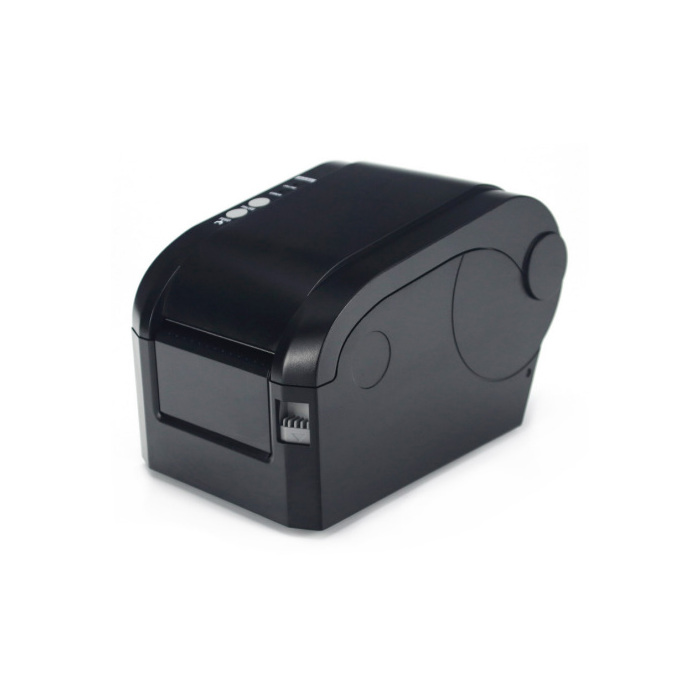
| Product information | Specified value |
|---|---|
| Printer type | Label printer |
| Enclosure dimensions | 198 x 116 x 143 mm |
| Thermal label size | 57 x 40 mm |
Check the media on the actual item
A label must remain attached and readable for its required service period. Test the selected label stock on the intended package or container, under the relevant temperature, moisture and handling conditions. Adhesive type, liner, roll arrangement and feed-detection requirements still need confirmation; the 57 x 40 mm dimensions do not specify them.
Heat and light can affect thermal printing, and rubbing or an unsuitable adhesive can create a separate failure. Where labels are scanned later in the process, include that later stage in the trial. A readable label at the printer is not enough if it becomes unreadable before dispatch or storage ends.
Validate the host-to-label data path
Supply the indicator or software name, output interface and proposed label format. Confirm the printer's connection, command requirements, character support and power supply for the configuration being quoted. Do not order a cable by connector shape alone or assume an interface that has not been specified.
During acceptance, compare the label with the source record: check net or gross designation, decimal places, units and identifiers. Test the workflow after changing media and restarting the host so that stale job data or an unintended repeat label is not overlooked. No built-in transaction tracking or automatic reprint control is implied.
Label and ticket choices
Q1. Is this interchangeable with the desktop ticket printer?
No direct substitution is established. MV-WA0009 is specified with a thermal paper roll for tickets, while this model lists thermal label media. Compare the required output, host commands and consumables before changing either printer.
Q2. What is needed for a meaningful sample-label test?
Provide the artwork, representative data including the longest field, the intended label stock and the surface to which it will be applied. Include the required storage period and a scanner specification when machine reading is needed. Agree the acceptance checks before treating the sample as approval for production.
Send an MV-WA0010 enquiry with the label sample, host connection details, expected printing demand and consumable quantity. Ask the quotation to separate the printer, power supply, connection cable, media and any integration work so that the delivery scope is clear.