Chinese
 Spanish
 Russian
 Portuguese
 French
 German
 Indonesian
 Thai
Thai Vietnamese
 Arabic
 Italian
 Turkish
 Polish
 Japanese


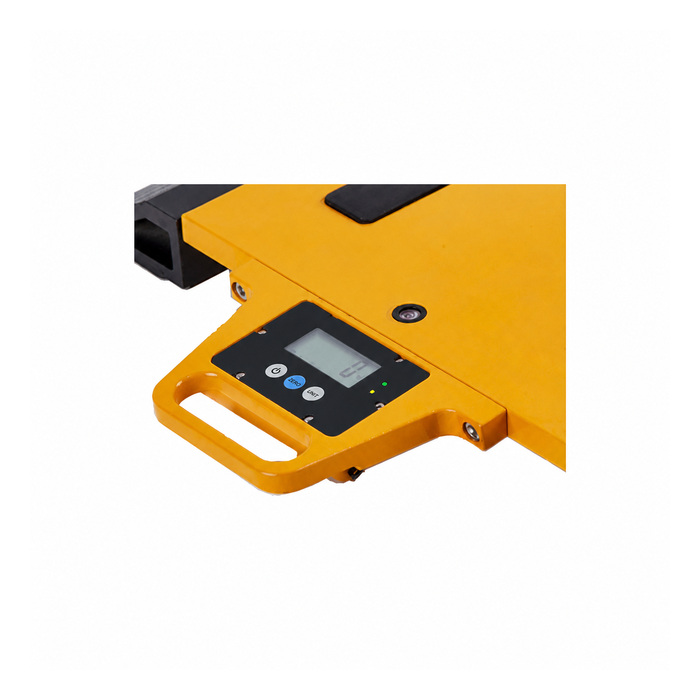
METRAVON MV-WI0002 combines wireless load-cell acquisition with a five-digit 18 mm backlit LCD at the scale. Two status LEDs and three keys are listed for this version. It communicates with a matched MV-WI0003 receiver using Zigbee 2.4 GHz and has a drive reference of up to eight 350-ohm load cells. The local display is the useful distinction from the LED-status node: an operator can be given a scale-side reading position without moving the receiver.
Decide what the scale-side operator needs to see
Specify whether the local reading is needed for positioning, checking a load or following a weighing sequence. Five display digits and an 18 mm character height describe the screen, not the weighing capacity or installed accuracy. Confirm the offered units, decimal setting and local key functions with the operating instructions. If tare or held readings are part of the procedure, demonstrate how the local indication relates to the receiver result before approving the workflow. Do not infer remote tare control or print functions from a three-key panel.
Connect a defined bridge circuit to the wireless load-cell node
Provide the load-cell sensitivity, bridge resistance, excitation requirements and total working signal, including tare. The stated maximum of eight 350-ohm cells is not permission to connect any eight sensors regardless of their electrical characteristics. The available node table does not state a bridge excitation voltage or millivolt input interval, so obtain both for the offered build before approving an existing scale circuit. Agree the terminal schedule and calibration method rather than carrying over settings from a different indicator.
Keep local display operation separate from receiver compatibility
A visible reading at the node is useful for checking one scale, but it does not prove that the receiver has the correct or current value. Confirm the matched MV-WI0003 configuration and document which physical platform belongs to each displayed channel. Where several nodes contribute to a result, test channel selection and any combined reading on the supplied receiver. A Zigbee radio does not directly provide PLC data, RS485 or Modbus RTU. If a controller must receive weights, specify and verify the actual receiver-side output as a separate part of the system.
| Item | Value | Selection notes |
|---|---|---|
| Local display | Five digits / 18 mm LCD | Backlit display; two LEDs and three keys are listed. |
| Sensor loading | Up to eight 350-ohm cells | Obtain excitation and input limits for the offered unit. |
| Matched receiver | MV-WI0003 | Confirm pairing and scale-channel assignment. |
| Radio reference | 2.4 GHz / 80 m | Zigbee link; test the actual operating area. |
| Node supply | 3.7 V lithium-ion | Battery capacity and charging method need confirmation. |
| Endurance descriptions | 16 h / 40 h | Do not select a shift duration from the longer figure alone. |
Agree battery duty for the backlit display
Both reference editions identify a 3.7 V lithium-ion battery; the Chinese edition also lists 4000 mAh. Continuous-use figures differ: 40 hours in the Chinese table and 16 hours in the English table for this LCD node. Have the offered battery and test conditions resolved before setting a shift-length requirement. Include backlight use, connected cells and radio traffic in that discussion. Confirm the charging method and whether operation during charging is supported instead of assuming a power connector is a continuous external supply input.
Test the reading where the platform will actually operate
The reference photo illustrates a node on an axle-scale platform, but it does not establish the capacity of that complete scale or an in-motion weighing approval. Verify the intended operating mode with the supplied platform and calibration procedure. Check the screen from the normal standing position, including glare and access to the keys. Test the radio path over the actual working area; the 80 m distance reference does not describe performance through every vehicle or metal structure. Finally compare local and receiver readings under stable load and observe their behaviour after disconnection and reconnection.
Where numerical indication is required only at the receiver, consider the MV-WI0001 LED-status node. For channel capacity and receiver operation, see the MV-WI0003 matched wireless receiver.
Display use, controller access and commissioning
Q1. Does the local display mean the receiver is unnecessary?
The node provides a local numerical indication, but a project may still require the matched receiver for its selected multi-scale workflow or data handling. Confirm any standalone operating requirement and calibration access before removing the receiver from the order.
Q2. Does five-digit indication establish a legal weighing division?
No. Digit count describes the display format. The permissible division and installed performance depend on the complete scale and its applicable approval requirements. Request the relevant system documents instead of treating the node display as a certificate.
Q3. Can local weight be sent directly to a PLC through RS485?
The documented node link is Zigbee to its matched receiver. A direct RS485 connection or Modbus map is not established here. Define the receiver-side interface and test the required weight, units and validity information with the controller.
Q4. What should be compared during commissioning?
Use a stable known load to compare the local display with the assigned receiver channel, including units and tare state. Repeat after power interruption and a controlled radio break. Record how an old or missing value is identified so operators do not mistake a retained reading for a current measurement.