Chinese
 Spanish
 Russian
 Portuguese
 French
 German
 Indonesian
 Thai
Thai Vietnamese
 Arabic
 Italian
 Turkish
 Polish
 Japanese

Industrial router SIM troubleshooting should begin with the last connection stage that succeeded. A card that is not detected, a modem refused by the network and a connected router unable to reach one server are different faults. "No network" does not identify which component should be replaced.
Before changing settings, record the current time, firmware, SIM state, operator registration and data-session status. Export the configuration through the approved management interface if available. Keep credentials and full subscriber identifiers out of public screenshots. A factory reset can remove the information needed to diagnose the fault and erase working machine-network settings.
Industrial router SIM troubleshooting in four states
| Last confirmed state | Investigate next |
|---|---|
| No card detected | Card format, seating, selected slot and hardware detection. An APN change cannot repair missing card contact. |
| Card detected | PIN status, permitted operator, radio compatibility and the reported registration result. |
| Registered | Service activation, operator-supplied APN, authentication and the reason a data session was rejected. |
| Data session active | Routes, name resolution and access to the actual destination from the device that needs the connection. |
Use the exact model instructions for accessing these states. Modem commands, status labels and diagnostic menus differ between firmware versions. Do not paste an unfamiliar modem command from another vendor's support page into a running industrial connection.
A compatible SIM still needs a compatible radio and service
If the card is not detected, follow the documented power-down and insertion method; do not assume hot swapping is supported. For a locked card, obtain the correct PIN or recovery instructions from its owner instead of repeatedly guessing. Incorrect attempts can make the original problem harder to recover.
If the card is detected but registration fails, collect the reported state and any rejection code. Check the ordered modem's supported bands against the operator and destination region. The antenna system must suit that radio configuration. Bars on a signal display do not establish permission to use the network.
Carrier restrictions, roaming permissions and device-binding policies belong to the SIM service. Verify them with the operator. A subscription that works in a phone does not prove that a particular industrial modem is supported under the same conditions.
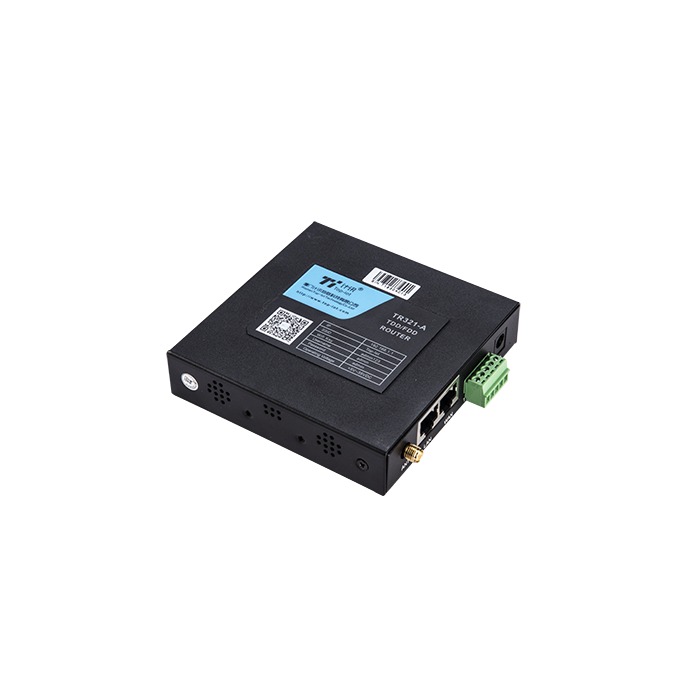
The METRAVON TR321 is a 4G router with one WAN and one LAN port, with a two-LAN configuration listed as an alternative. Identify the installed port roles before testing an attached PLC or laptop. Changing SIM settings will not correct a local device connected to a port with the wrong role.
Use a cross-test that changes one variable
A useful comparison keeps the router, antenna position and power supply unchanged while a known-compatible, authorised SIM is tested. If that card connects and the original does not, investigate the original service and its required configuration. This is stronger evidence than changing the card, antenna and APN together.
The converse test places the original SIM in a known-compatible device using the correct service settings. Record what each test actually proves. Success on another device does not establish the original router's radio-band compatibility; failure in both devices does not prove that both devices are defective.
Respect operator device-binding rules and the site's maintenance window. Cross-testing is not a reason to remove a production SIM or copy a private APN configuration to an unauthorised device.
Once connected, test the intended data path
Use the APN, IP family and authentication supplied for that subscription. A private APN may deliberately provide access only to an enterprise network. Failure to reach a public website is not, by itself, a failure of that service.
After a data session is established, check the route used by the intended destination. A wired WAN or VPN may be taking precedence over the cellular connection. Test name resolution and the required application endpoint separately. A blocked ping is not conclusive when the network does not permit ICMP.
If the router reaches the server but its LAN client cannot, examine the client's address, gateway and DNS settings, then the relevant forwarding policy. Do not disable the firewall or expose the management interface to prove connectivity. Where network access works but a platform remains offline, continue with the platform connection checks instead of repeating SIM replacement.
Q1. Should I force a particular radio band?
Only after confirming that the band is supported by the modem and available from the intended operator. A restrictive setting can prevent registration elsewhere or after network changes. Retain the previous configuration and document why the restriction is needed.
Q2. Does the TR321 automatically read PLC registers?
A routed link and instrument acquisition are separate functions. Verify any requested polling, protocol conversion or MQTT payload function against the ordered firmware. An online modem proves neither that a serial device is being polled nor that its values are reaching the server.
Q3. What should be sent with a support request?
Include the TR321 hardware and firmware identification, country, operator, port-role diagram, failed connection stage and a short time-stamped log. Share sensitive APN or subscription details through an approved private channel. State the outcome of each controlled test, including whether the fault changed.
Summary
Find the first failed stage before changing hardware. Ask METRAVON to review the TR321 variant and connection evidence when local checks cannot establish the cause. Following recovery, confirm the intended application path and an authorised reconnection test, then retain the configuration that actually worked.