Chinese
 Spanish
 Russian
 Portuguese
 French
 German
 Indonesian
 Thai
Thai Vietnamese
 Arabic
 Italian
 Turkish
 Polish
 Japanese

Industrial router disconnections should be investigated from the first event that failed, not from the last message shown on a dashboard. A site marked offline may have lost power, cellular registration, an IP route, a VPN session or only its application connection. Preserve the evidence before rebooting so the next test addresses the failing part of the path.
Build one timeline from the router and the receiving system
Record the incident time, last accepted application message and router uptime. Compare the device clock with the server clock; unsynchronised timestamps can make a reconnect appear to precede the failure that caused it. Export logs while they are still available and note any restart already performed by an operator or watchdog.
Use independent observations where possible. A server missing a heartbeat does not establish that the router rebooted. A modem showing a registered state does not establish that the destination application is reachable. Keep those observations distinct instead of calling them all signal loss.
| Evidence | Likely area to test | Useful next check |
|---|---|---|
| Uptime reset | Power, restart settings, firmware or hardware. | Compare the reset time with supply and system events before changing the SIM. |
| No network | SIM service, radio registration or antenna path. | Read the available modem state and check the ordered cellular variant. |
| No route | APN, address assignment, routing or DNS. | Test a controlled destination at the required network and service layers. |
| VPN lost | Tunnel configuration, authentication or reachability. | Compare both endpoints' logs with the underlying uplink state. |
| App offline | Identity, credentials, heartbeat or server processing. | Check whether the server received, rejected or failed to process the connection. |
Confirm the exact router before changing its configuration
The TR321 4G industrial router offered by METRAVON has two Ethernet ports whose WAN/LAN roles depend on configuration. It also lists RS232 with optional RS485/RS422 variants. Record the delivered version, firmware, port assignment and connection method before following instructions written for a different router.
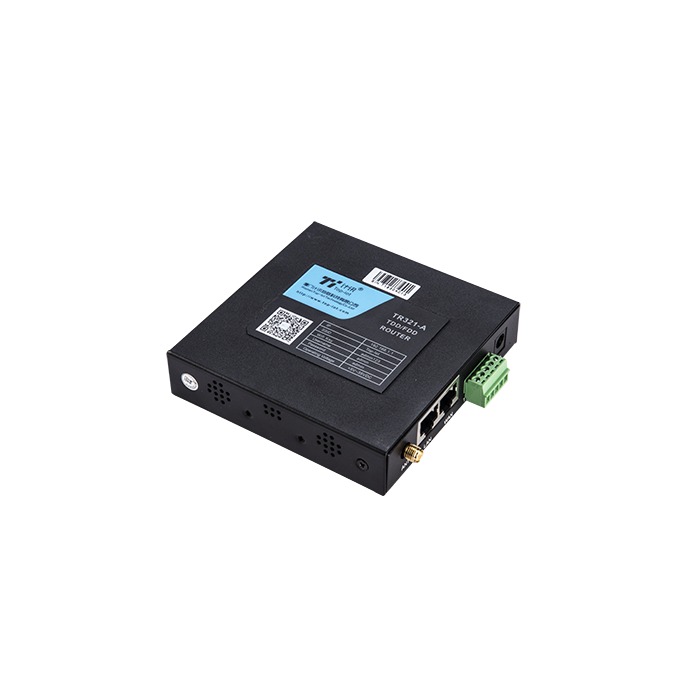
Save an approved configuration copy and identify how to restore access if a change disconnects the maintenance session. Avoid changing the APN, radio preference, VPN and application heartbeat in one attempt. A recovered connection after several simultaneous changes does not reveal which change helped or whether the fault will return.
Industrial router disconnections with a simultaneous reboot
When uptime resets, start with the supply and restart evidence. Under an approved electrical procedure, have qualified personnel assess voltage at the router terminals during relevant load changes. An unloaded power-supply measurement may miss a drop caused by wiring resistance, shared equipment or a transient demand.
Check supply capacity and connections against the exact hardware requirements. Inspect the enclosure environment and signs of condensation or overheating. TR321 is listed as IP30, so direct exposure to rain or washdown is not an acceptable installation assumption.
If the supply remains within the specified conditions, examine configured watchdog actions and available restart reasons. A watchdog may be responding to an unreachable target rather than a failed router. Confirm that the monitoring target is appropriate before repeatedly restarting otherwise functioning equipment.
Follow registration, IP service and the destination in order
Check whether the SIM is recognised and the modem registers with the expected operator. Confirm subscription status, APN and the cellular bands of the delivered module. A SIM working in a phone is useful comparative evidence, but it does not prove the router has the same supported bands, settings or antenna conditions.
Use the available radio diagnostics rather than relying only on signal bars. Where reported, retain RSRP, RSRQ and SINR together with the band, cell identity and time. These observations help compare antenna locations and operating periods; there is no single signal-bar threshold that proves the whole data path is reliable.
Inspect antenna connections, cable damage and placement under the site's safe-maintenance procedure. Confirm which connectors are cellular or Wi-Fi and which antennas the selected modem requires. Do not infer a MIMO or dual-module arrangement from unused-looking connectors on a related product photograph.
After registration, check address assignment, the intended route and destination-name resolution. Test the actual service where permitted. A failed ping may reflect filtering, while a successful ping does not prove that the required application port accepts connections. Keep tests on authorised endpoints and avoid opening public management access as a troubleshooting shortcut.
If the uplink works, investigate the session above it
For a deployed VPN, correlate both ends' records for authentication, certificate validity, clock problems and tunnel renegotiation. Confirm the supported and approved method for the actual firmware. Do not enable an old protocol merely because it appears in a broad compatibility list.
At the application layer, look for duplicate device identities, expired credentials, rejected payloads or a heartbeat interval inconsistent with the server's timeout. Determine whether the server received the connection before increasing retry frequency. Rapid reconnect loops can add load and obscure the original rejection.
Where the local serial instrument is the missing source, compare its communication result with router connectivity. A healthy WAN cannot correct a wrong RS485 option, serial address or device map. The tag-list acceptance guide separates acquisition errors from transport errors.
Verify the repair with a controlled recovery test
Choose a safe maintenance interval and a test that represents the suspected failure. Record the start of the interruption, restored network service and the first valid application record. Include any configured backup path only if it is present in the ordered hardware and service arrangement.
If records are buffered elsewhere in the system, verify their recovery at that component. A router reconnect does not demonstrate that the PLC, RTU or platform retained missing history. Check for duplicates and preserve acquisition timestamps when backfilled data is accepted.
Define the observation period and conditions needed to judge improvement. One successful reconnect is insufficient evidence for a fault that previously occurred during a specific daily load or environmental change. Keep the original configuration and a concise record of each change so the result can be reproduced.
Troubleshooting questions
Q1. Should the router be rebooted every day?
A scheduled reboot introduces its own interruption and can erase diagnostic evidence. It may be a documented temporary measure, but it should not replace investigation of the reason for lost service. Check whether the restart actually restores the failed application or merely resets the dashboard status.
Q2. When is changing the antenna justified?
When installation inspection or comparative radio measurements point to the antenna path. Verify band compatibility, connectors and placement before buying another antenna. Repeat the comparison under similar conditions and check application recovery as well as received signal.
Q3. Does a public IP address solve remote-access failures?
Not by itself. Routing, firewall policy, service configuration and authorised access still matter. Use the organisation's approved remote-access design rather than exposing an administration port to bypass a private-network limitation.
Q4. What should be sent for fault review?
Provide the model and firmware, network diagram, exact incident times, uptime and relevant logs. Remove passwords, private keys and SIM credentials before sharing. Include one change at a time and its observed result so the investigation can distinguish a device issue from an upstream or application fault.
Summary
Preserve evidence, locate the failing layer and verify recovery under representative conditions. Request a METRAVON connectivity review with the sanitised incident record before replacing equipment or making broad changes to a functioning network.