Chinese
 Spanish
 Russian
 Portuguese
 French
 German
 Indonesian
 Thai
Thai Vietnamese
 Arabic
 Italian
 Turkish
 Polish
 Japanese

When an industrial router configuration page will not open, identify the management path before resetting the equipment. A browser failure may result from the wrong Ethernet port, an unexpected address, a routing conflict or a disabled web service. A factory reset can remove the working cellular and remote-access configuration without resolving the original cause.
Preserve access before testing
Record the model, firmware if known, port labels, connected cables and current laptop network settings. Establish whether the router is carrying production traffic and who owns its configuration. If another approved management channel still works, export the settings before making changes.
Use an authorised maintenance connection. Do not introduce an unfamiliar DHCP server or duplicate address onto a running machine network. Where isolation is needed, agree the interruption with the operator rather than disconnecting a controller simply to simplify the test.
Find the industrial router configuration page from the actual port roles
The METRAVON TR321 has one WAN and one LAN port, with a two-LAN configuration available. The connector used for management therefore depends on the saved configuration and access policy. Do not assume that every Ethernet socket exposes the same management service.
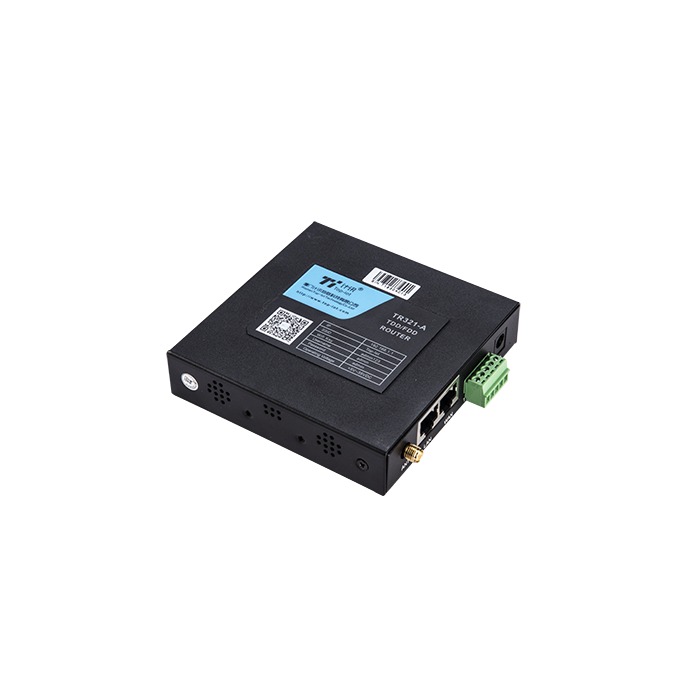
Confirm link status on the router and service computer. A known-good cable can isolate a cable fault, but changing ports may also change the subnet or access rules. Record each change. If no physical link is established, investigate the port, cable and power before changing browser settings.
| Observed result | What it narrows down | Next check |
|---|---|---|
| No link | The physical Ethernet connection is not established. | Check power, cable and the documented port function under the approved maintenance procedure. |
| Link, no access | A working cable does not prove a usable IP path. | Compare addresses, masks, routes and the laptop interface used for the connection. |
| Login page | The web service is responding at this address. | Follow the authorised credential-recovery process; avoid repeated login attempts that can trigger lockout. |
| Certificate error | A service answered, but browser trust or identity checks failed. | Verify the intended device, hostname, clock and certificate arrangement before entering credentials. |
Verify the address instead of guessing a default
Use commissioning records, an approved address inventory or a relevant DHCP lease to identify the current management address. A factory-default address is useful only if the device still uses it. A sticker or manual from a related model is not evidence of this installation's settings.
Inspect the laptop's active address, mask and route. Wi-Fi, a VPN or another Ethernet adapter can send traffic through an unintended path. Change only the adapter or route needed for the authorised test, record the original settings and restore them afterwards. Do not disable the organisation's security controls as a shortcut.
For a direct local connection requiring a temporary static address, use a confirmed unused address in the correct subnet. Do not assign the router's own address to the laptop. A network engineer should review an unfamiliar subnet before the test, especially when the cabinet connects to production systems.
Distinguish a missing web service from a browser problem
Check the documented HTTP or HTTPS scheme and any configured management port. A connection timeout and a responding login page are different findings. A successful ping alone does not prove that the web service is enabled, while blocked ping does not prove the device is unreachable.
If access is restricted by interface or source address, use the approved management route. Keep remote administration protected; do not expose it to the public internet to work around local access difficulties. Certificate warnings should be investigated rather than suppressed without checking device identity.
When several devices might share an address, isolate the suspected conflict through an authorised test. Reaching a login page is not enough: verify the model and device identity before applying settings.
Recovery questions
Q1. When is a factory reset appropriate?
After the correct device and failure have been identified, the owner authorises the outage, and the configuration can be restored. Obtain the exact model's reset procedure and the information needed for cellular, VPN and platform access. A reset is not a substitute for diagnosing a laptop routing error.
Q2. Can a serial port always provide a recovery console?
No. Confirm whether the delivered hardware has a service console, its electrical interface and the supported procedure. A general RS232 or RS485 connection may be assigned to instrument traffic; connecting an improvised console can disrupt that traffic or use the wrong electrical level.
Q3. What should be sent for technical assistance?
Provide the model, firmware, port used, a redacted address plan, link status and the exact browser or connection error. Remove passwords and private keys. State whether production communication continues and whether any reset has already occurred.
Summary
Restore the management path in order: physical link, address and route, then the web service and authorised login. Request a METRAVON access review with the observed results before erasing a configuration that may still be carrying useful traffic.