Chinese
 Spanish
 Russian
 Portuguese
 French
 German
 Indonesian
 Thai
Thai Vietnamese
 Arabic
 Italian
 Turkish
 Polish
 Japanese

Key points for selection
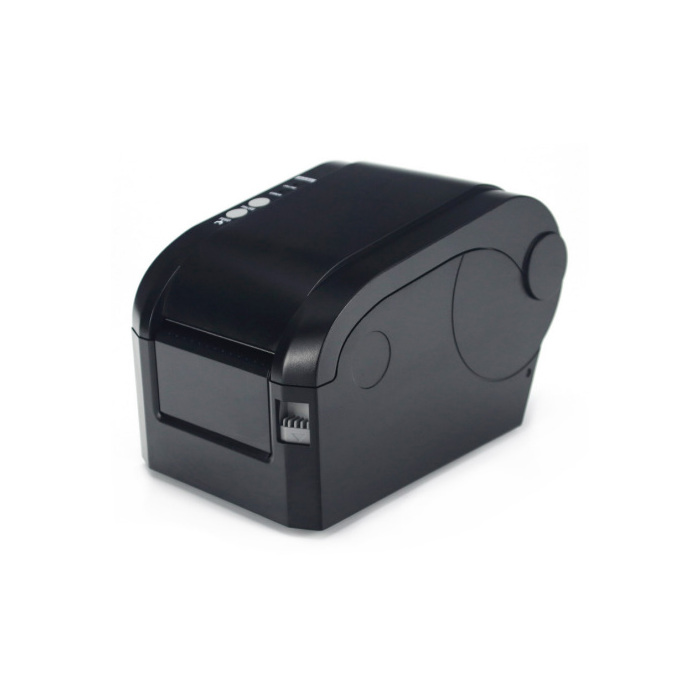
Focus on checking 198×116×143mm, label printer and compatibility with existing weighing indicators or sensors.
Product overview
MV-WA0010 is a label printer, and the pages are organized according to the single product data page, which is used for procurement preliminary selection, replacement verification and project interface confirmation. Product type label printer; overall dimensions: 198×116×143mm; consumables: 57mm ×40mm thermal label paper.
Applicable scenarios and purchasing value
Used for weighing records, labels or batch voucher output, suitable for production, warehousing and logistics links. It is necessary to confirm the instrument printing protocol, interface, paper specifications and installation method.
This page is organized according to a single product. The parameters and pictures are from the corresponding information page of the product and are not spliced with other models. Items with unclear information will be marked as order confirmation items.
Technical parameters
| product type | label printer |
|---|---|
| Overall dimensions | 198×116×143mm |
| Consumables | 57mm ×40mm thermal label paper |
Selection steps
- First determine the purpose of the attachment in the system
- Check the number of interfaces, wiring or communication protocols
- Confirm the overall dimensions, openings and installation space
- Confirm material, shielding, explosion-proof or environmental requirements
- Confirm compatibility with target instrument or sensor
Installation and commissioning suggestions
- Construction according to wiring diagram and retain wire numbers
- Keep signal lines away from power cables and inverters
- The printer and large screen must first complete the protocol joint commissioning.
- Increase rain protection, grounding and surge measures for outdoor equipment
FAQ
What problems does MV-WA0010 mainly solve?
It is a label printer, used for weighing records, labels or batch voucher output, suitable for production, warehousing and logistics links. It is necessary to confirm the instrument printing protocol, interface, paper specifications and installation method.
Can I replace it only by appearance size?
No. Also check the interfaces, number of connections, adjustment methods, materials, mounting cutouts and supporting instrumentation protocols.
Do accessories need to be consistent with the instrument brand?
Not necessarily, but the electrical interface, communication or printing protocol, wiring definition and power supply must be compatible, and key functions should be jointly tested and confirmed before placing an order.
What is the difference between adjusting the excitation and adjusting the signal in the junction box?
Both methods are used to adjust the fulcrum angle difference, but the circuit methods are different and should be matched with the sensor and on-site maintenance habits, and cannot be selected based on the shell alone.
Why does the weighing signal line emphasize shielding?
The load cell output is usually a low-level millivolt signal. Frequency converters, motors and power cables may introduce interference. Shielding and proper grounding can help with stability.
How to check printer compatibility?
Check the serial port or other interface, baud rate, printing protocol, paper specifications, installation space and power supply. It is best to jointly debug with the target instrument before leaving the factory.
Is bigger screen size better?
It should be selected according to the observation distance, ambient brightness, installation height, viewing angle and communication distance. If it is too large, it may increase the installation and power supply costs.
What should you pay attention to when using it outdoors?
When the protection level is not specified in the data, rainproof boxes, sunshades, sealed joints and reliable grounding should be added, and the temperature and humidity range should be confirmed.
How to check and accept after installation?
Check wiring and fixing, verify zero point, loading, communication, display or print results, and keep interface parameters and wiring records.
What is needed for the request for quotations?
In addition to the purpose, please provide supporting instruments, interfaces, installation dimensions, cable length, environment and quantity. The verified product information on this page includes: product type label printer; overall dimensions 198×116×143mm; consumables 57mm ×40mm thermal label paper.
Ordering instructions
When ordering, please indicate the supporting instruments or sensors, interface/wiring method, size, cable length, printing paper or display specifications, installation environment and quantity; if there are explosion-proof requirements, the applicable scope must be confirmed separately.